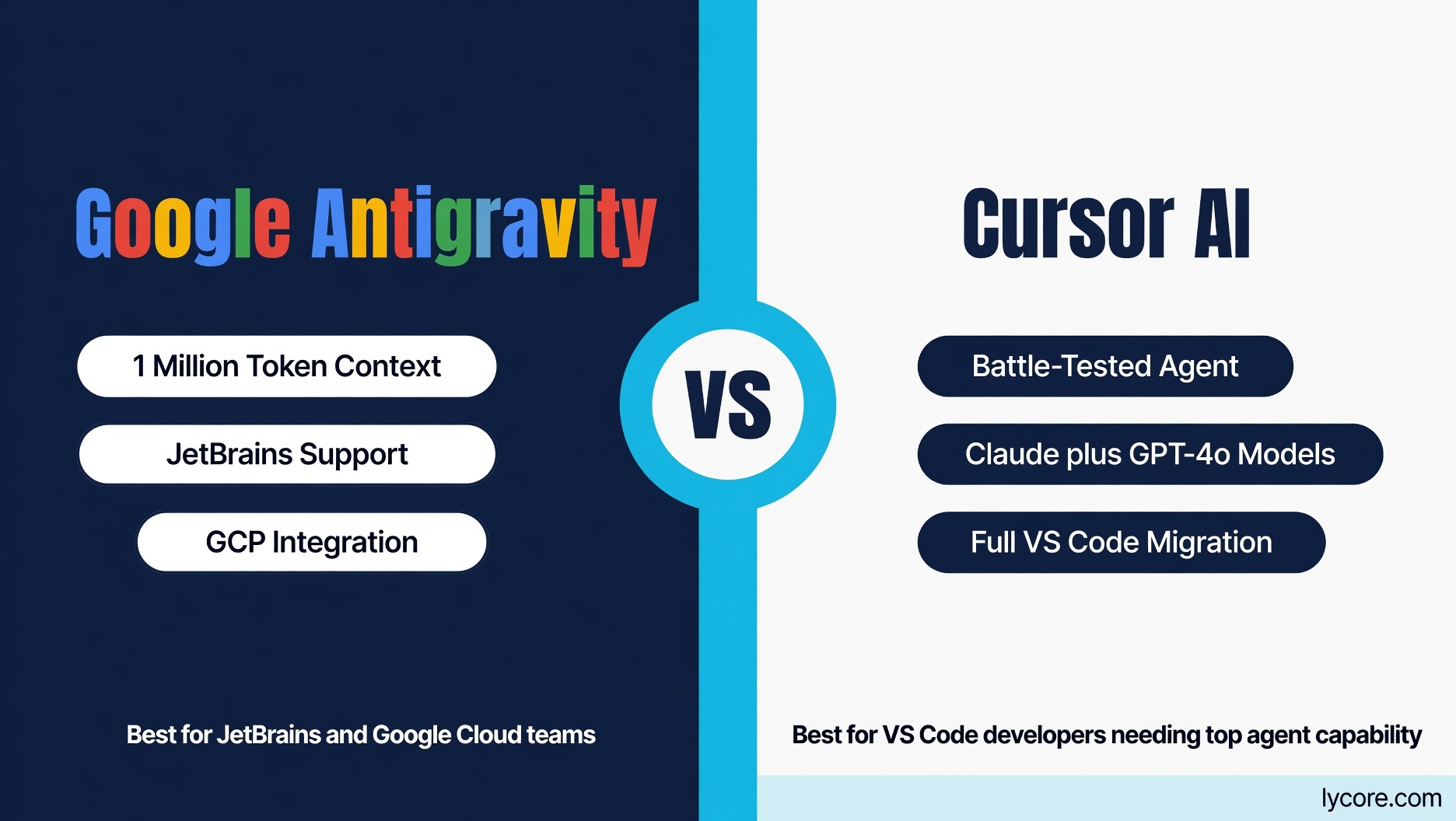
A new AI coding tool from Google went from zero to Breakout status on Google Trends in February 2026. Searches for Google Antigravity — and specifically Google Antigravity vs Cursor AI — spiked as developers tried to understand what this new entrant was and whether it was worth switching from their current AI coding setup. This guide gives you the complete picture: what Google Antigravity actually is, how it compares to Cursor AI across every important dimension, and which tool deserves a place in your workflow.
What is Google Antigravity?
Google Antigravity is Google’s agent-first IDE, launched in November 2025 as a significant evolution of Google’s AI coding tooling. It brings together several of Google’s AI coding capabilities — Gemini Code Assist, Project IDX, and Google’s internal coding intelligence — under a unified developer experience. Antigravity is a standalone desktop IDE built on a fork of VS Code, so it replaces your editor rather than plugging into VS Code or JetBrains IDEs.
The name “Antigravity” reflects Google’s positioning: coding tools that eliminate the friction, weight, and slowness that makes software development hard. The platform runs Google’s current Gemini models (with third-party models on higher plans), with context windows up to 1 million tokens — the largest context window of any mainstream AI coding tool. For very large monorepos and enterprise codebases, this context capacity is a genuine differentiator that no other tool currently matches at scale.
Google Antigravity Pricing in 2026
- Free: individual access with a weekly usage quota and weekly rate limit
- Google AI Pro subscribers: a higher quota that refreshes every five hours, a higher weekly limit, and optional paid AI credits for overages
- Google AI Ultra subscribers: the highest quotas and access to third-party models; teams get access through Gemini Enterprise on Google Cloud terms
What is Cursor AI?
Cursor is an AI-first IDE built as a fork of VS Code, developed by Anysphere. It has become one of the most popular AI development tools among individual developers and startups since its 2023 launch, known for its superior codebase context management, highly capable agent mode, and model flexibility. Cursor uses Claude Sonnet and Opus, OpenAI’s GPT models, Gemini, and its own fine-tuned completion models depending on the task type. Its defining advantage has been its codebase-wide indexing and its Composer/Agent mode for autonomous multi-file changes.
Cursor Pro is USD 20/month and includes a monthly pool of usage credits, with Pro+ (USD 60/month) and Ultra (USD 200/month) for heavier use. Cursor Teams is USD 40/user/month. The tool is VS Code only — it replaces your editor rather than plugging into it, which carries migration cost for non-VS Code users but near-zero friction for the large VS Code community.
Google Antigravity vs Cursor AI: Context Window Comparison
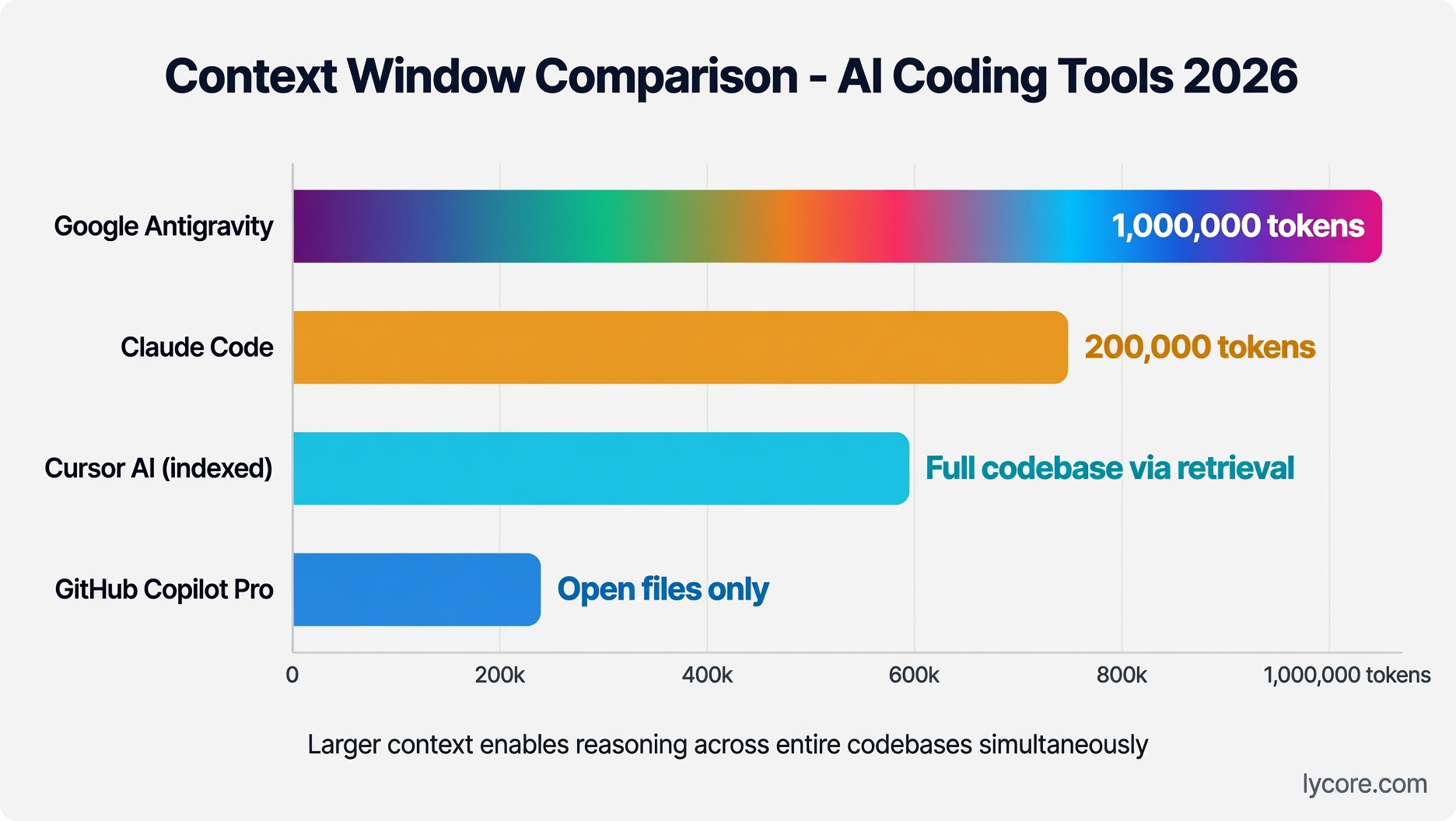
The context window comparison is where Google Antigravity makes its most striking claim. Gemini’s 1 million token context window dwarfs Cursor’s codebase indexing approach. In theory, 1 million tokens allows Antigravity to load an entire large enterprise codebase — millions of lines of code — into a single context. Cursor’s codebase indexing is excellent but uses a retrieval approach: it finds and loads the most relevant code chunks rather than loading everything simultaneously.
In practice, the comparison is more nuanced. A 1 million token context window is theoretically powerful but computationally expensive — generating responses with a million tokens of context takes longer and costs more than a well-targeted retrieval of the most relevant 50,000 tokens. Cursor’s indexed retrieval, while smaller in absolute terms, is often faster in practice and has been refined through 18 months of production use. For most real-world tasks, Cursor’s retrieval-based context approach produces responses quickly enough that the theoretical context window advantage of Antigravity is not felt. For tasks that genuinely require reasoning across a huge portion of a very large codebase simultaneously, Antigravity’s approach has a meaningful advantage.
IDE Integration: Plugin vs Replacement
Google Antigravity is a standalone IDE built on a fork of VS Code, so like Cursor it replaces your editor rather than plugging into it. VS Code users will find either tool familiar. Neither is a JetBrains plugin, so developers who live in IntelliJ, PyCharm, Rider or WebStorm need to switch editors to use either one.
Cursor requires a full editor migration — you replace VS Code with Cursor. For existing VS Code users, this is nearly frictionless since Cursor is a VS Code fork and imports all your extensions and settings. For JetBrains users, it requires switching editors entirely, which is a significant workflow disruption.
Code Completion Quality
For inline code completions — the ghost-text suggestions that appear as you type — both tools deliver competitive quality in 2026. Gemini Flash models are fast and produce high-quality completions for common patterns across all major languages. Cursor’s completion models, including its own fine-tuned variants, have been highly optimized for low-latency, contextually accurate completions.
The main difference in completion quality shows up in codebase-specific context. Cursor’s indexing means its completions are more aligned with your project’s specific patterns, naming conventions, and coding style. Antigravity’s larger context window theoretically enables similar project-specific awareness, but in practice requires more explicit configuration to achieve the same level of project-specific completions that Cursor provides automatically.
Agent and Autonomous Coding
Cursor’s agent mode (formerly Composer) is the most battle-tested autonomous coding agent in an IDE environment. It has handled millions of multi-file tasks across a huge range of codebases and edge cases since 2023. Developers report high reliability for complex tasks like “refactor this service to add caching,” “implement this feature following our existing patterns,” or “update all API calls after this interface change.”
Google Antigravity’s agent capabilities launched with the platform in November 2025 and are less mature in production use. The underlying Gemini models are highly capable, and Google’s engineering resources are vast — but the agentic scaffolding, error recovery, and edge case handling of a brand-new agent platform has not gone through the same production refinement as Cursor’s. Early developer feedback has been positive for straightforward agentic tasks; complex, long-horizon tasks have been more variable in reliability. Expect this gap to close rapidly as Antigravity accumulates production usage and feedback.
Google Ecosystem Integration
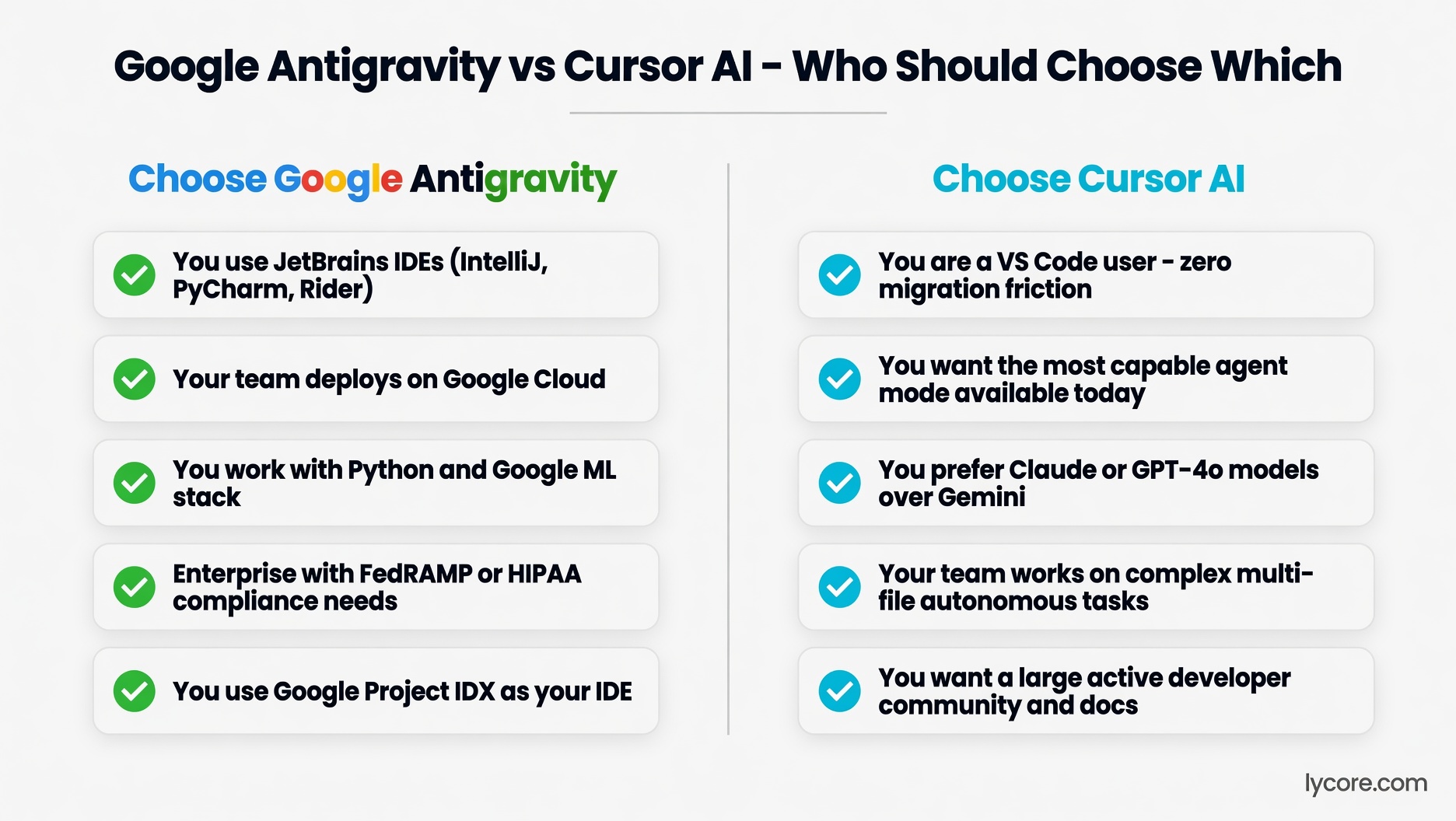
Google Antigravity has natural advantages for developers working in the Google ecosystem. Integration with Google Cloud, BigQuery, Cloud Run, and GCP services is first-class. Developers building on Firebase, using Cloud Storage, or deploying to GKE will find Antigravity understands their infrastructure vocabulary, generates correct GCP-specific configuration, and integrates with Google’s cloud tooling in ways that Cursor does not natively support. For Google Cloud-native development teams, this integration depth is a genuine advantage that goes beyond raw AI capability.
Google also offers Firebase Studio (formerly Project IDX), a separate cloud-based development environment with Gemini built in that runs entirely in the browser. Cursor does not have a cloud-based IDE counterpart. For developers in contexts where local development environments are impractical (Chromebooks, shared workstations, highly mobile workflows), Firebase Studio is a compelling option with no direct Cursor equivalent.
Privacy and Enterprise Security
Google Antigravity Enterprise includes VPC Service Controls — Google’s enterprise security feature that allows organizations to define a security perimeter around their GCP resources, preventing data from leaving the defined boundary. This is a significant enterprise security feature that no other AI coding tool currently offers. For large enterprises with strict data governance requirements already operating within GCP, VPC Service Controls makes Antigravity the only tool that fits their security architecture.
Both tools provide commitments that code is not used for model training on paid tiers. Google has established enterprise trust credentials through its GCP compliance certifications — SOC 1/2/3, ISO 27001, FedRAMP, HIPAA — that apply to Antigravity’s enterprise offering. Cursor’s enterprise privacy commitments are strong but the vendor maturity and compliance certification depth does not yet match Google’s enterprise portfolio.
Google Antigravity vs Cursor AI: Pros and Cons
Google Antigravity Pros
- 1 million token context window — largest of any mainstream AI coding tool
- Agent-first design with a manager view for running multiple agents in parallel
- Familiar VS Code-based editor for VS Code users
- Deep Google Cloud integration for GCP-native teams
- VPC Service Controls for enterprise data governance
- Free individual plan with a weekly usage quota
- Google’s enterprise compliance certifications (FedRAMP, HIPAA, SOC 2)
Google Antigravity Cons
- Agent mode less mature than Cursor’s — launched November 2025 vs Cursor’s 2023
- 1M token context is slower in practice than Cursor’s targeted retrieval for typical tasks
- Codebase-specific completion quality requires more configuration than Cursor
- Developer community smaller than Cursor’s at this stage
- Gemini models less preferred than Claude by many developers for coding tasks
Cursor AI Pros
- Most capable agent mode for complex multi-file tasks — battle-tested since 2023
- Automatic codebase-specific context — learns your project patterns from day one
- Model flexibility: Claude, GPT and Gemini models
- Near-zero migration from VS Code — all extensions and settings transfer
- Large, active developer community and extensive documentation
Cursor AI Cons
- VS Code only — no JetBrains, Visual Studio, or other IDE support
- Requires full editor migration for non-VS Code users
- No cloud IDE option — local development only
- Context window smaller than Antigravity’s 1M tokens for very large codebases
- Less mature enterprise compliance portfolio than Google
Frequently Asked Questions
Is Google Antigravity worth switching to from Cursor?
For most VS Code users currently happy with Cursor, switching is not worth it today. Cursor’s agent mode is more capable and more refined for complex tasks, and its codebase context quality is excellent for most project sizes. The situations where Antigravity makes switching worthwhile: you work on very large monorepos where 1M token context provides meaningful advantages over retrieval-based approaches, or you are a GCP-native team where Antigravity’s cloud integration depth is valuable. For individual VS Code developers doing typical product development, Cursor’s current edge in agentic capability makes it the better choice — though check back as Antigravity matures rapidly.
What is Gemini CLI and how does it relate to Antigravity?
Gemini CLI is a command-line interface for Google’s Gemini models, available as a separate tool from Google Antigravity. Like Claude Code (which is also CLI-based), Gemini CLI enables terminal-based AI interactions and basic agentic coding capabilities. It is less fully featured than either Claude Code or Cursor’s agent mode, but it is free for personal use within Gemini’s generous free tier limits. Gemini CLI is a separate product from Google Antigravity — Antigravity is the agent-first IDE, while Gemini CLI is the terminal-based agent. “Gemini cli” is itself a Breakout rising query in Google Trends as developers explore Google’s full coding tool ecosystem.
Does Google Antigravity work for Python and data science workflows?
Yes, and this is a strong use case for Antigravity given Google’s historical strength in Python, machine learning, and data science tooling. Antigravity understands Google’s ML ecosystem deeply — TensorFlow, JAX, Vertex AI, BigQuery ML, and Google Colab patterns are all well-represented in Gemini’s training data. For data scientists and ML engineers working in Python with Google’s ML stack, Antigravity’s domain knowledge is a meaningful advantage over Cursor, which has equal general Python capability but less Google-ecosystem-specific depth. For pure web or backend development without Google Cloud dependencies, this advantage is not relevant.
Conclusion
Google Antigravity vs Cursor AI is a comparison that will become increasingly competitive as Antigravity matures. Today, Cursor leads on agentic task capability, developer community, and VS Code-specific experience. Antigravity leads on context window size, Google Cloud integration, and enterprise compliance depth. The decision is clear-cut for VS Code developers doing complex agentic tasks (Cursor). For everyone else, particularly GCP-native teams and large enterprise buyers, Antigravity’s unique advantages in context scale and compliance architecture deserve serious evaluation alongside Cursor’s proven capability. Keep an eye on Antigravity’s agent mode maturity through 2026 — the gap with Cursor will narrow.
Choosing AI development tools for your engineering team or building on Google Cloud? Talk to Lycore — we help US software teams implement effective AI development tooling strategies.