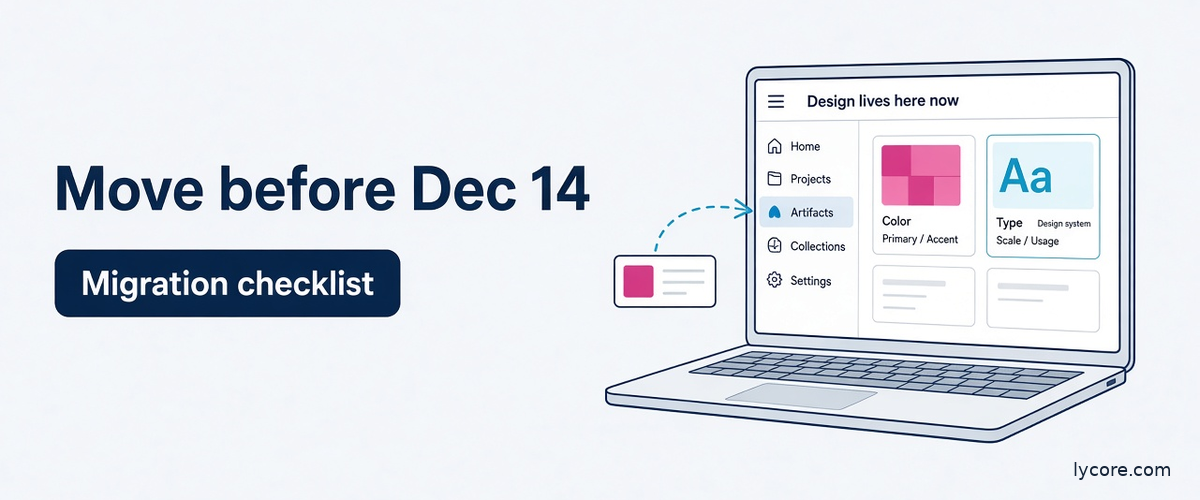
Claude Design artifacts are now the home for everything you used to make on the standalone Claude Design site. Anthropic moved Design into regular Claude conversations on September 16, 2026, and the standalone site at claude.ai/design closes on December 14, 2026, after which it becomes read-only. In Claude, new designs, design systems and slide decks are created as artifacts. Your design systems and projects can move over, but chats and comments cannot, and public links to standalone projects stop working when the site closes.
Key takeaways
- Claude Design artifacts replace the standalone claude.ai/design site, which closes and becomes read-only on December 14, 2026, so teams should move design systems and projects into Claude before then.
- Anyone who can use Claude Design can click Move team design systems on the Artifacts page, and one move copies every design system in the organization, including ones owned by others.
- Chats, comments and public links do not move, design systems built from starter themes do not move, and moving a project makes its standalone copy permanently read-only.
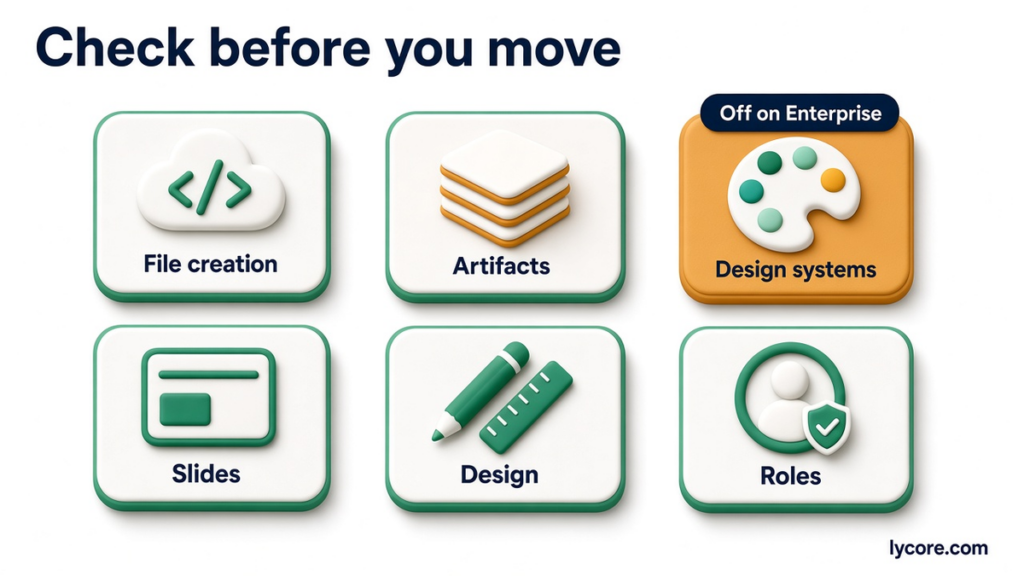
- On Enterprise plans design systems are off by default, so owners should turn them on and confirm Artifacts and cloud code execution are enabled before anyone starts a move.
- Projects can be backed up from the standalone site by choosing Share, then Project HTML with Project archive selected, which exports a .zip containing all project files.
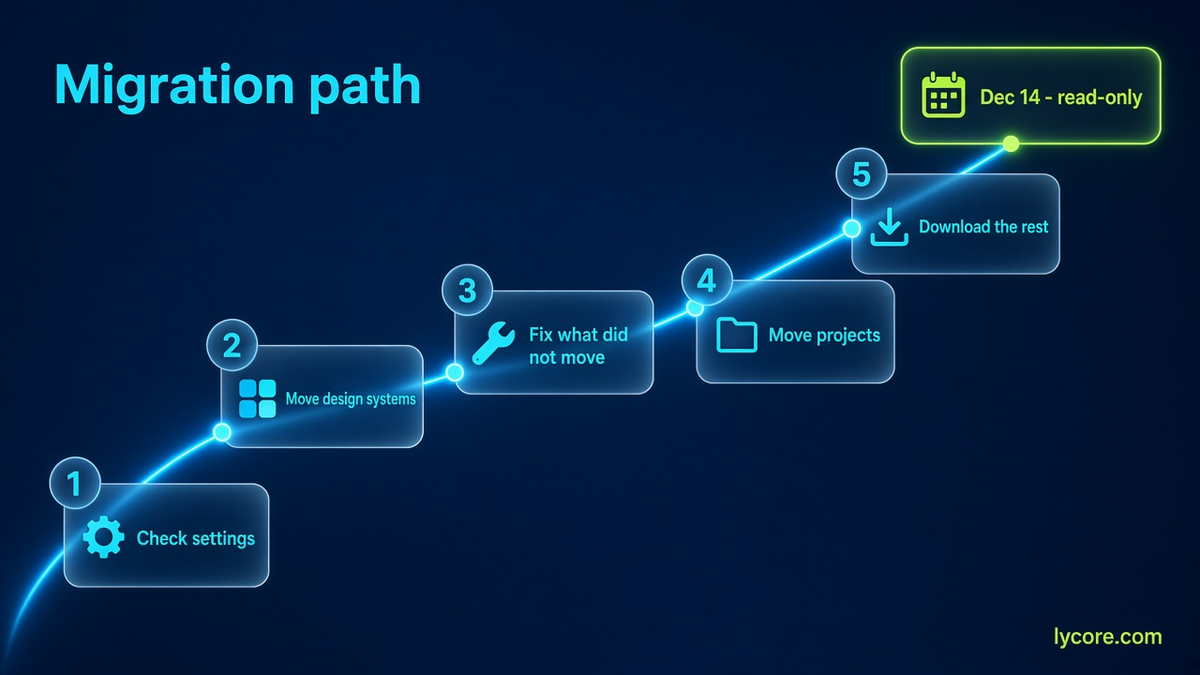
As of November 8, 2026. Short answer: open the Artifacts page in Claude and use Move team design systems once to copy every design system in your organization. Then have each project owner move their projects from claude.ai/design, or have an organization owner use Move everything on Team and Enterprise. Download anything that cannot move, and save chats and comments you care about before December 14.
This checklist is based on Anthropic’s Help Center article on moving from standalone Claude Design to Claude, the Artifacts admin guide, the Claude Design product page and the October 8, 2026 Dashboards and Motion announcement. Button names change during rollouts, so if a label on your screen differs slightly from the one here, look for the closest match.
What Is Changing With Claude Design on December 14, 2026?
Claude Design launched as a separate site where you described a visual and Claude built a first version you could refine and share. Since the Cowork and chat merge on September 16, Design also works inside any Claude conversation, including Claude Code and the Artifacts tab. Anthropic is now retiring the separate site.
The timeline
- September 16, 2026: Claude Design starts working inside conversations; the standalone site keeps working.
- October 8, 2026: Anthropic says Docs, Slides and Design are out of beta and available on every plan, including Free, and that the standalone site stays at claude.ai/design until December 14.
- October 15, 2026: Docs, Slides and Design turn on by default for Enterprise organizations.
- December 14, 2026: the standalone site closes and becomes read-only. You cannot start new projects there.
What read-only means after the deadline
After December 14, items left in the standalone version become read-only, with one exception: the owner of a project that has not moved can still change its files so that it can be moved. Originals and chats are deleted some time after closure under Anthropic’s data retention practices. In plain terms, the deadline is the last day for normal work on the old site, not a hard data wipe, but you should not plan on a long grace period.
Who this affects
Claude Design is available on Free, Pro, Max, Ultra, Team and Enterprise plans, so anyone who built a project or a design system on claude.ai/design needs to act. Teams are affected most, because shared design systems carry brand rules that every new deck and screen depends on. Individual users mostly need to move or download their projects.
What Moves to Claude Design Artifacts and What Stays Behind?
This is the table to share with your team before anyone clicks a button. It summarizes the Help Center article as of November 8, 2026.
| Item | What happens | What to do |
|---|---|---|
| Design systems | Copied to Claude; originals stay in the standalone version | Run one organization-wide move from the Artifacts page |
| Projects | Moved one at a time or in bulk; each becomes an artifact; the standalone copy becomes read-only for everyone | Owners move their own; owners on Team and Enterprise can move everything |
| Files | Included in moves | Clean up oversized or unsupported files first |
| Chats with Claude | Do not move; deleted some time after closure | Copy anything important into a doc |
| Comments | Do not move | Resolve or record decisions before moving |
| Public links | Stop working after December 14 | Re-share the new artifact link |
| Sharing | Carries over where Claude supports it | Check external sharing settings in Claude |
The one-way rules that catch people out
Two rules deserve emphasis. First, once a project moves, its standalone copy becomes read-only for everyone, and that cannot be undone. Second, edits made to a design system in the standalone version after it has moved do not carry over; you have to make them again in Claude. The practical consequence is simple: freeze design system edits on the old site once you start the move, and tell your designers which home is now authoritative.
What does not move at all
Empty design systems do not move, and neither do design systems created from a built-in starter theme, even if you edited them. If your team customized a starter theme into its real brand system, plan to rebuild it in Claude, where you can create design systems from a GitHub repository, design files, a local codebase or raw uploads.
How Do You Move Team Design Systems?
Design systems move first, because new designs and decks in Claude pick them up from the design system menu. The good news is that one person can do it for the whole organization.
Step by step
- Open the Artifacts page in Claude.
- Click Move team design systems in the banner titled Claude Design lives here now. If you closed the banner, use the menu on the Design tile under Make something new.
- Click Move to confirm. Individual plans skip the confirmation and start immediately.
- Wait for it to finish. Closing the window does not stop the move.
- Review the Moved list, which shows each design system with its owner and an Open link.
Who can start it
Anyone who can use Claude Design can start the design system move, not only organization owners. One move brings over every design system in the organization, including ones owned by other people, so it only needs to happen once. Each design system keeps its owner and sharing list. If the owner has left the organization, the Primary Owner becomes the owner. Published design systems that were not private are shared with the whole organization in Claude.
After the move
Moved design systems appear in the design system menu when you create designs and slide decks. Choose View design systems from the Claude Design menu to see them all in Settings. Owners can mark one as the organization default with Set as default, and if your organization’s default design system moves, it becomes the default in Claude too unless one is already set. Moved design systems are read-only on their own page; to change one, you ask Claude to make the change. If you need to re-run the move, Move again picks up new design systems and ones changed in the standalone version, and skips ones already edited in Claude.
What If a Design System Doesn’t Move?
Some design systems fail on the first attempt. They appear under Didn’t move with a reason, such as being too large. The fix happens on the old site.
The fix loop
Click Fix in Claude Design Standalone in the item’s row, then click Check on the card that asks whether this design system can move to Claude. The card lists blocking files by problem: too large (shrink or remove), unusable name (rename), unsupported file type (convert or remove), not allowed in a design system artifact (remove), cannot be opened (re-save or remove), unreadable characters, or missing contents (re-upload or remove). Fix them, click Check again until nothing is blocking, and then move again from the Artifacts page. Anthropic notes that the uploads folder often contains duplicates and is a good place to start trimming.
Organization-level blockers
Three problems stop the whole move and must be fixed by an owner: design systems are turned off for the team, the team cannot publish artifacts, or the design system owner’s role lacks design system permissions. Items blocked this way appear under Not started. If design systems are off, owners see an Open Organization settings button, while other users see the move button grayed out.
The last resort
If the card says the design system cannot move and gives no reason, click Download design system to keep a copy, check again later and contact Anthropic support if it still fails. Do this well before December 14. A support ticket opened in the final week is a risk you do not need.
How Do You Move Claude Design Projects?
Projects keep working in the standalone version until it closes, and the Artifacts page lists up to 60 of them, which open in the standalone version. Anthropic says project moves are rolling out gradually to paid plans, so you may not see the option on day one.
Moving a single project
Only the project owner can move a project. Open it at claude.ai/design and start the review from the pop-up or the banner at the top of the project. The review lists what moves, what changes and what stays. You can download a .zip copy first, which we recommend for anything client-facing. Confirm, keep the tab open until the move finishes, then open the project in Claude, where it appears as an artifact on the Artifacts page. Private projects stay private, and if the owner has left, the project goes to an organization owner, who sees a list called Projects moved to you.
Bulk moves
Users can move all of their own projects at once or pick specific ones. On Team and Enterprise plans, organization Owners or the Primary Owner can use Move everything on the Artifacts page, which also moves templates and design systems. Admins without owner rights cannot start it. Items that cannot move stay in the standalone version, and the results explain why.
Downloading as a backup
To keep a local copy, open the project on the standalone site, click Share, choose Project HTML (for slide decks, look under More formats and apps), keep Project archive selected and click Export. You get a .zip with all project files. Anthropic says this is free and does not count toward usage limits. The archive includes files only, not chats or comments. A bulk download option is rolling out alongside Move to Claude on the standalone home page.
Admin Checklist for Claude Design Artifacts
On Team and Enterprise plans, most failed migrations trace back to settings, not files. Run through this list before anyone starts a move.
Settings to check
- Organization settings, then Capabilities: Cloud code execution and file creation must be on, because it is a prerequisite for Artifacts.
- Organization settings, then Artifacts: Artifacts must be on (it is on by default).
- Design systems under Templates: on by default for Team but off by default for Enterprise, so Enterprise owners usually need to turn it on.
- Design and Slides under Templates: on by default.
- Enterprise custom roles: the role editor needs matching Artifacts and design system permissions, or a design system owned by someone in that role cannot move.
Governance after the move
In Claude, any user with access can create a design system, share it with specific people and delete their own. Only an Owner or Primary Owner can share a design system with everyone, set the organization default or delete one shared with everyone, and a design system must be shared with everyone before it can be the default. The old Claude Design Admin permission from the standalone site does not apply to design systems created in Artifacts, so review who holds owner roles. The Claude Design product page also says admins can lock a team to one approved design system.
Encryption, retention and special configurations
Organizations using customer-managed encryption keys can move projects and design systems, and moved projects are encrypted under their key; the standalone version never supported customer-managed keys. Organizations with zero data retention cannot turn on artifacts, so they cannot move anything and should download projects before the site closes. Some other special data configurations cannot move projects yet, so check with your Anthropic account team. Finally, if your retention policy covers artifacts, a moved item can be deleted if nobody opens it for the retention period, with the clock starting on the move date.
Working With Claude Design Artifacts After the Move
Once everything has moved, the workflow is arguably better than the standalone site, because design work sits next to the conversations, documents and code it belongs to.
Imports, exports and sharing
According to the Claude Design product page, you can import DOCX, PPTX or XLSX files or a codebase, and export to PPTX, PDF or HTML. Anthropic’s October 8 announcement says PowerPoint and PDF downloads keep the formatting from the editor, and decks can go straight to Google Slides as editable files. Every artifact gets a link that is private by default. Admins control external sharing in Organization settings, then Artifacts, including a per-artifact exception when external sharing is otherwise off.
Design systems in Claude Code
For engineering teams, the more interesting change is that Design works inside Claude Code. The product page lists a /design-sync command to pull a design system into Claude Code and a /design command to create, edit and sync design projects. That closes some of the gap between a brand system in a design tool and the tokens in your front-end code. If you are evaluating coding agents more broadly, our Claude Code vs GitHub Copilot comparison covers the wider trade-offs.
Usage and connected apps
Design work counts toward your plan’s usage limits, and larger requests such as a full deck use more. The product page lists connected apps including Adobe, Canva, Gamma, Lovable, Miro, Replit, Vercel and Wix, and says Claude Tag support is coming. Our Claude Tag guide explains how Claude works inside Slack today.
What This Means for Product and Engineering Teams
The migration is a small admin task with a bigger strategic meaning: Anthropic is consolidating documents, decks, designs and code into one workspace with one sharing model.
Treat the design system as source of truth
If you build software, the design system you move into Claude will drive decks, mockups and possibly code generated by Claude Code. Use the migration as a chance to audit it: remove duplicate uploads, align colors and type with your production CSS or design tokens, and pick one organization default. A design system that disagrees with your codebase will produce mockups your engineers cannot build as drawn.
Plan for links and history you lose
Public links to standalone projects stop working on December 14. If you shared prototypes with clients, investors or user-research participants, list those links now and send replacements. Design rationale that lived only in Claude chats or comments needs to be copied into a Claude Doc or your product wiki. This is the same lesson as any platform change: decisions belong in durable documents, not in tool-specific threads. For a wider view of how Anthropic’s merged workspace changes day-to-day automation, see our Claude Cowork vs Zapier vs n8n breakdown.
Pros and Cons of the Move to Artifacts
Pros
- One organization-wide design system move that anyone with Design access can start.
- Owners and sharing lists are preserved, and orphaned items go to the Primary Owner.
- Design now sits next to chats, Docs, Slides and Claude Code.
- Customer-managed encryption keys apply to moved projects.
- Free .zip export of project files as a backup.
Cons
- Chats and comments do not move, and public links break on December 14.
- Project moves are one-way and make the standalone copy read-only.
- Starter-theme design systems do not move, even if customized.
- Enterprise has design systems off by default, which blocks moves until an owner fixes it.
- Zero data retention organizations cannot move anything and must download.
Frequently Asked Questions
What happens if I do nothing before December 14, 2026?
Your standalone projects and design systems become read-only on claude.ai/design, and you cannot start new projects there. The owner of an unmoved project can still change its files in order to move it, so you are not locked out immediately. However, public links to standalone projects stop working, chats and comments are never carried over, and Anthropic says originals and chats are deleted some time after closure under its retention practices. It has not published an exact deletion date. Doing nothing is therefore a gamble with a known downside and an unknown timeline. Moving design systems takes minutes, so there is little reason to wait.
Do I need to be an admin to migrate design systems?
No. Anyone who can use Claude Design can start the design system move from the Artifacts page, and one move copies every design system in the organization, including ones owned by others. What does require an owner is fixing organization-level blockers, such as turning on design systems under Templates, allowing the team to publish artifacts or granting role permissions on Enterprise. Owners or the Primary Owner are also the only people who can use Move everything for projects on Team and Enterprise, and admins without owner rights cannot start it. Coordinate who runs the move so people are not confused by duplicate attempts, even though a repeat move simply marks unchanged items as already moved.
Can I keep editing a design system in the standalone site after moving it?
You can, but you should not. Edits made in the standalone version after a design system has moved do not carry over automatically, so you would have to repeat them in Claude. Move again will pick up design systems changed in the standalone version, but it skips any that were already edited in Claude, and to replace a moved copy with a fresh one the owner must delete it in Claude and move it again, ideally after duplicating it to keep any Claude-side edits. The clean approach is to freeze standalone edits as soon as the move completes and make all future changes in Claude by asking Claude to update the design system.
Does Claude Design cost extra after the move?
Anthropic says Claude Design, Claude Slides and Claude Docs are included in every plan, including Free, and it has not announced a separate charge for design artifacts. Design work counts toward your plan’s usage limits, and larger requests such as a full slide deck use more of the limit. Downloading project archives from the standalone site is free and does not count toward usage. Claude Dashboards is a separate beta on paid plans and Claude Motion is a beta on Team and Enterprise, so check what your plan includes if your team wants those as well. Check Anthropic’s pricing page for current plan prices, as these change.
The Bottom Line
The move from standalone Claude Design to artifacts in Claude is straightforward if you do it in the right order: check organization settings, move design systems once for everyone, fix anything that did not move, then move or download projects. The hard deadline is December 14, 2026, and the irreversible parts are chats, comments and public links, so capture those first. Done well, the migration leaves your team with one place for designs, decks, docs and code, and a cleaner design system than the one you started with.
Building a product that needs a design system wired into real code, or AI features of your own? Talk to Lycore. See examples of apps we designed and built on our Our Work page, or read about our AI development services. Talk to Lycore.