Custom web development means designing and building a website or web application around your own workflows, data and customers instead of adapting a template or an off-the-shelf platform. It pays off when your site has to do real work, such as handling logins, payments, integrations or business logic that templates cannot express, and it is usually overkill for a simple marketing site. This guide explains what custom development actually involves, where it beats templates and SaaS builders, where it does not, what it costs in USD, and how US founders and operators can evaluate a development partner.
Key takeaways
- Custom web development makes sense when your site carries business logic, integrations or user accounts that templates and website builders cannot handle cleanly or securely.
- For a brochure site with a few pages and a contact form, a well-configured WordPress, Webflow or Squarespace site is usually faster and cheaper than custom code.
- Measure any build against Core Web Vitals, conversion and maintenance cost rather than design taste, because those numbers decide whether the investment pays back.
- A realistic custom web application budget starts around USD 7K-15K for a focused first version and rises with user roles, integrations and compliance needs.
- Choose a partner who shows working software, explains trade-offs plainly, keeps hosting and accounts in your name and assigns the code to you on full payment.
What a Custom Build Actually Means
The phrase covers a wide range of work, so it helps to be precise. At one end is a marketing website with a bespoke design built on a headless CMS. At the other end is a full web application with user accounts, dashboards, payments and integrations into your CRM or ERP. What they share is that the structure, data model and behavior are designed for your business rather than inherited from a template.
How it differs from templates and builders
Most businesses choose between four options:
- Website builders such as Wix, Squarespace and Webflow: hosted, visual editors with built-in hosting and limited control over code and data.
- CMS themes such as WordPress themes or Shopify themes: a pre-built design and feature set adapted to your content, extended with plugins or apps.
- Vertical SaaS platforms: ready-made software for a specific job, such as booking, ticketing or learning management, configured rather than built.
- Custom development: your own codebase, built by your team or a partner, using frameworks such as React, Next.js, Vue, Django, Laravel, Ruby on Rails or Node.js.
What a custom build includes
A typical custom web project has a frontend (often React or Next.js), a backend API (for example Django REST Framework, Laravel or Node.js with Express or NestJS), a relational database such as PostgreSQL or MySQL, and hosting on AWS, Google Cloud, Azure, Vercel or a similar provider. Around that sit authentication, an admin area, automated tests, a CI/CD pipeline and monitoring. PostgreSQL is a sensible default for most business applications because it handles relational data, JSON fields and full-text search well.
The important point is that custom does not mean writing everything from scratch. Good teams lean on mature frameworks and well-maintained libraries, and write custom code only where your business is genuinely different. That keeps cost down and makes the codebase easier for future developers to pick up.
Core Benefits of Custom Web Development
The benefits are real, but they are not automatic. Each one depends on the team building for that outcome deliberately.
Design and user experience built around your users
Templates are designed for an average business. If your customers follow an unusual path, for example configuring a quote, booking a multi-step service or comparing plans with complex rules, a custom interface can model that path directly. You decide the information architecture, the forms and the error handling instead of working around a theme’s assumptions. The commercial value comes from removing friction in the steps that lead to revenue, not from visual novelty.
Business logic that lives in one place
Many companies run their operations on a website plus a stack of plugins, Zapier automations and spreadsheets. Each piece works on its own, but the rules are scattered and fragile. A custom application lets you put pricing rules, approvals, permissions and notifications into one tested codebase. When a rule changes, it changes once.
Integrations on your terms
Custom builds can integrate deeply with the systems you already run: Stripe for payments, Salesforce or HubSpot for CRM, QuickBooks or NetSuite for accounting, and internal databases or legacy APIs. Instead of relying on whatever a plugin vendor chose to support, you control how data flows, how errors are retried and what is logged. Our API development and integration services page describes this kind of work in more detail.
Ownership and portability
With a custom codebase in your own repository and hosting account, you are not tied to a builder’s pricing changes or platform limits. Under a typical agreement, the code and IP are assigned to you once the project is paid in full, and the hosting, domain and data can sit in your company’s name from the start.
Performance and SEO: What Custom Code Can and Cannot Fix
Search performance is one of the most cited reasons to go custom, and it deserves a careful look because it is often oversold.
Core Web Vitals are a build-quality question
Google’s Core Web Vitals measure loading (Largest Contentful Paint, with a good threshold of 2.5 seconds or less), responsiveness (Interaction to Next Paint, good at 200 milliseconds or less) and visual stability (Cumulative Layout Shift, good at 0.1 or less). Heavy themes with dozens of plugins, multiple page builders and third-party scripts often struggle on these metrics, especially on mid-range phones. A custom frontend built with server-side rendering or static generation, optimized images and minimal JavaScript can hit them consistently.
That said, a lean WordPress theme with careful plugin choices can also pass Core Web Vitals. The difference is that custom code gives you control over every script on the page, while a template asks you to fight the defaults.
Technical SEO you control
With a custom build you decide the URL structure, canonical tags, internal linking, XML sitemaps and structured data (schema.org markup for products, articles, FAQs, events or local business details). You can render content on the server so crawlers see it immediately, which matters for JavaScript-heavy frameworks. Next.js, Nuxt and Remix all support server rendering for this reason.
What custom code cannot fix
No framework replaces useful content, a clear site structure and links from other sites. A fast site with thin content will not rank. Treat custom development as removing technical obstacles to SEO, not as an SEO strategy on its own. Google has used mobile-first indexing for all sites for several years, so the mobile version of your pages is the one that counts, regardless of how the site is built.
Scalability, Security and Integration Depth
As a business grows, a website often turns into an application: customer portals, partner dashboards, internal tools and APIs. This is where the architecture decisions made early start to matter.
Scaling traffic and data
Most custom web applications scale comfortably on a single well-sized application server and a managed database such as Amazon RDS for PostgreSQL. As traffic grows you add caching (Redis, a CDN such as Cloudflare or CloudFront), background job queues (Celery, Sidekiq, BullMQ) and read replicas. You rarely need microservices on day one, and splitting too early adds operational cost. A modular monolith with clear internal boundaries is usually the better starting point, with services split out only when a specific part needs to scale or deploy independently.
Security posture
Template sites are not insecure by nature, but popular CMS platforms are frequent targets, and outdated plugins are a common entry point for attackers. A custom application has a smaller, known dependency list and no public plugin ecosystem to exploit. It still needs the basics done properly: parameterized queries, framework-level protection against cross-site scripting and CSRF, strong password hashing, multi-factor authentication for admins, role-based access control, secrets kept in a manager such as AWS Secrets Manager, and dependency scanning through tools such as GitHub Dependabot. Security comes from practice, not from the word custom.
Privacy and regulatory fit
If you collect personal data from US residents, state privacy laws such as CCPA/CPRA in California can apply depending on your size and activities, and companies with EU users may also need to consider GDPR. Accessibility is another US concern, since websites have been the subject of ADA-related claims; building to WCAG 2.1 or 2.2 AA is a sensible target. A custom build makes it easier to implement consent management, data export and deletion requests, and accessible components, but ask your counsel which obligations apply to you.
Custom Web Development vs Templates: A Direct Comparison
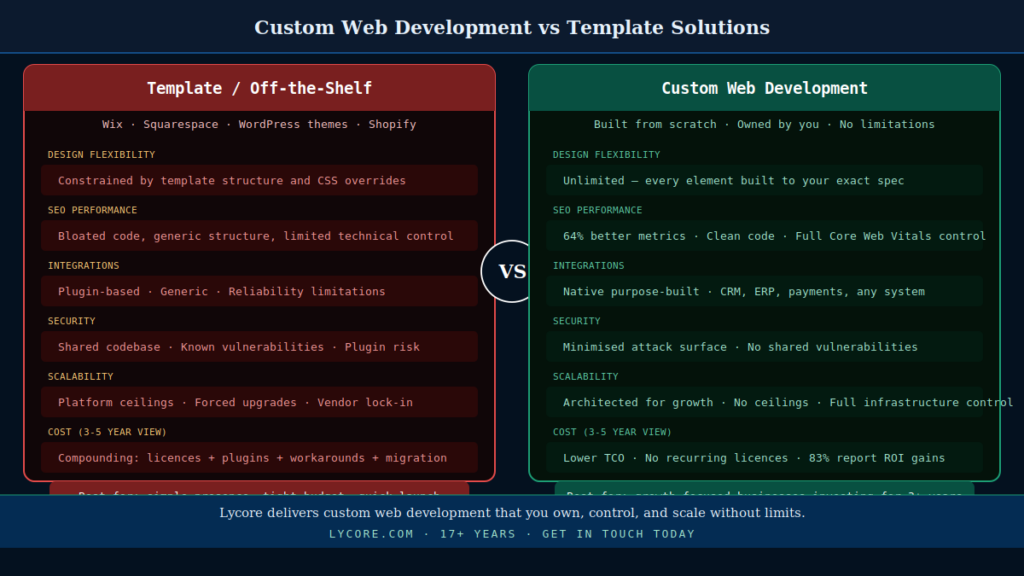
The honest answer to custom versus template is that each wins in different situations. The table below summarizes the trade-offs most US businesses weigh.
| Factor | Website builder or theme | Custom web development |
|---|---|---|
| Time to launch | Days to a few weeks | Several weeks to several months |
| Upfront cost | Low, mostly subscription and setup | Higher, typically from USD 7K-15K for a focused first version |
| Design control | Limited by the template and editor | Full control over layout, flows and components |
| Business logic | Plugins, apps and automations | Built and tested in one codebase |
| Integrations | Whatever plugins and connectors support | Any system with an API or database access |
| Performance | Varies, often weighed down by scripts and plugins | Can be tuned for Core Web Vitals from the start |
| Maintenance | Platform updates handled by the vendor; plugin updates by you | Your team or partner maintains code and dependencies |
| Lock-in | Tied to the platform’s pricing and limits | Portable codebase you own after full payment |
When a template is the right call
If you need a marketing site with a blog, a few service pages and a contact form, a good template on WordPress, Webflow or Squarespace is usually the right choice. You can launch quickly, your marketing team can edit content, and you avoid maintaining code. Many companies start this way and add a custom application later, for example a customer portal on a subdomain.
When custom is the right call
Custom development earns its cost when the website is part of how you deliver your product or run operations: marketplaces, booking platforms, SaaS products, B2B portals, internal tools and anything where workflows, permissions and integrations are central. Our 12-step guide to building a web app walks through what that process looks like.
The hybrid option
A common middle path is a headless setup: a CMS such as WordPress, Sanity, Contentful or Strapi for marketing content, with a custom frontend or application alongside it. Marketing keeps editing freedom, and engineering keeps control over performance and the application layer.
What a Custom Website or Web App Costs in USD
Cost is driven by scope, not by the word custom. The biggest drivers are the number of user roles, the number of distinct workflows, integrations, compliance requirements and how polished the design must be.
Indicative budget bands
As a reference point, Lycore works at USD 25 per hour offshore, or on a fixed project price or monthly retainer. Indicative bands look like this:
- USD 7K-15K: a focused first version, such as a booking or quoting tool, a simple customer portal or an internal dashboard with one or two integrations.
- USD 15K-30K: a fuller web application with several roles, payments, an admin area and integrations such as Stripe and a CRM.
- USD 30K-50K: multi-role platforms, marketplaces or products that combine a web app with mobile apps.
- Above USD 50K: larger systems with complex integrations, heavy data processing or demanding reliability requirements.
US onshore agencies typically charge considerably more per hour, so the same scope can cost several times more. Whoever you hire, ask for an estimate broken down by feature so you can see where the money goes and trim scope if needed. Our article on how much it costs to build an app goes into the cost drivers in more depth.
Running costs after launch
Budget separately for hosting, third-party services and maintenance. A modest web application on AWS, Google Cloud or a platform such as Render or Vercel can run on a small monthly hosting bill, but email delivery, error tracking, search, maps and AI APIs all add usage-based fees. Plan for ongoing maintenance as well, because frameworks, libraries and browsers change, and dependencies need regular security updates.
Where the savings show up
The long-term case for custom software is that it replaces recurring workarounds: manual data entry between systems, per-seat fees for tools you only partially use, and staff time spent on processes that software could handle. Write down those costs before you commit, so you can judge the build against a real baseline rather than a hope.
How to Choose a Development Partner
The partner matters more than the framework. A strong team with a sensible process will deliver a maintainable product on most mainstream stacks; a weak one will struggle on any of them.
Evaluate working software
Ask to see live applications the team built, ideally ones you can log into. Look for similar complexity to your project: multiple roles, payments, integrations or real-time features. Lycore’s Our Work page, for example, shows working apps rather than mockups, so you can judge the quality of the product directly.
Check the process
A good partner will propose a short discovery phase to agree scope, wireframes and architecture before quoting the full build. During development you should get access to a staging environment, see working features every sprint and have a single accountable project lead. Ask how they handle code review, automated testing, deployments and change requests.
Settle ownership and access early
Insist that the code repository, cloud account, domain and third-party services such as Stripe sit in your company’s name from the start, with the vendor added as users. Confirm in the contract that the code and IP are assigned to you once the project is paid in full, and ask your attorney to review the IP, confidentiality, warranty and termination clauses.
Plan for support
Ask what happens after launch: a warranty period for defects, then a retainer or block of hours for maintenance and improvements. A partner who will not discuss support is telling you something about how long they expect to be involved.
Pros and Cons of Custom Web Development
Pros
- Design and workflows shaped around your users and your operations rather than a template’s assumptions.
- Business rules, permissions and integrations live in one tested codebase.
- Full control over performance, Core Web Vitals and technical SEO.
- A portable codebase you own once the project is paid in full, without platform lock-in.
- Room to grow from a website into a customer portal, SaaS product or internal platform.
Cons
- Higher upfront cost and a longer time to launch than a template or website builder.
- Ongoing maintenance responsibility for code, dependencies and hosting.
- Quality depends heavily on the team; a poor build can be harder to fix than a template.
- Non-technical staff may need an admin area or CMS built in to edit content easily.
- Overkill for simple marketing sites where speed and low cost matter more than control.
Frequently Asked Questions
Is custom web development worth it for a small business?
It depends on what the site has to do. If your website is mainly a marketing presence with service pages, a blog and a contact form, a good template is usually the better investment, and you can spend the difference on content and advertising. Custom development becomes worth it when the website is part of how you deliver your service or run operations, for example online booking with complex rules, a customer portal, quoting, a marketplace or integration with your CRM and accounting tools. A useful test is to list the manual work and tool subscriptions the custom build would replace and compare that annual cost with the build and maintenance budget.
How long does a custom web development project take?
A focused first version, such as a booking tool or a simple customer portal, often takes six to twelve weeks from discovery to launch. A fuller web application with several user roles, payments and integrations commonly takes three to five months, and multi-role platforms or products with mobile apps can take longer. The biggest schedule risks are scope that keeps growing during the build, slow feedback and decisions on the client side, and integrations with third-party systems that turn out to be poorly documented. A short discovery phase at the start, a clearly defined first release and weekly reviews of working software are the most reliable ways to keep a timeline on track.
Which technology stack should I use for a custom website or web app?
For most business applications, mainstream and well-supported choices are the safest: React or Next.js on the frontend, a backend such as Django, Laravel, Ruby on Rails or Node.js, PostgreSQL as the database, and hosting on AWS, Google Cloud, Azure or a managed platform. The best choice depends on the team that will maintain it, the libraries you need and your hiring plans, more than on raw performance. Avoid niche frameworks unless there is a specific reason, because finding developers later becomes harder. Our article on the benefits of ReactJS covers one of the most common frontend choices.
Can I move from a template site to a custom build later?
Yes, and many companies do exactly that. A common pattern is to keep the marketing site on WordPress or Webflow and launch a custom application alongside it, for example on an app or portal subdomain, then migrate further pieces as needs grow. When you do migrate content pages, plan the move carefully: keep URLs where possible, set up 301 redirects for any that change, carry over titles, meta descriptions and structured data, and monitor Google Search Console for crawl errors after launch. Export your content and customer data from the old platform early, since some builders make bulk export harder than others, and check what your contracts with plugin or app vendors allow.
Conclusion
Custom web development is not automatically better than a template; it is better when your website carries real business logic, integrations or user accounts that off-the-shelf tools handle poorly. In those cases, a custom build gives you control over user experience, performance, security and data, and a codebase you own once it is paid for. For simpler sites, a well-chosen template is faster and cheaper. Decide based on what the site must do, set a realistic USD budget for both the build and maintenance, and choose a partner who shows working software and is clear about ownership and trade-offs.
Building a custom website or web application? Talk to Lycore. We can help you decide whether custom development is the right fit, scope a sensible first version and build it through our web app development team.