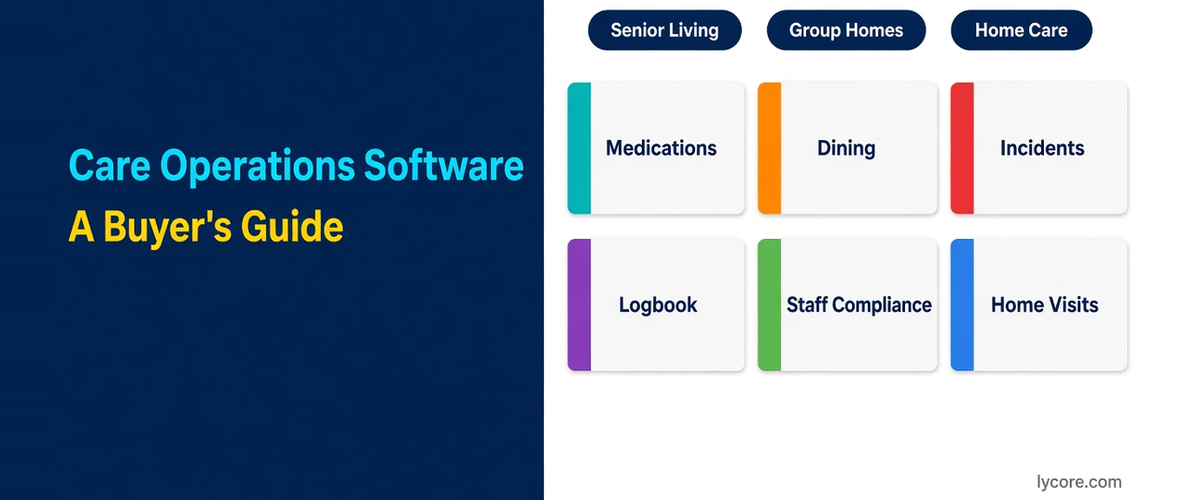
Most care organizations do not have a software problem; they have a coordination problem that software either fixes or makes worse. A nurse needs to know which doses are late, a dining aide needs to know who is on pureed food, a manager needs to know which caregiver’s certification expired on Friday, and a guardian’s lawyer needs one report without seeing anything else. Care operations software is the category of tools that tries to hold all of that in one place: the daily work of caring for people, the staff who do it, the rules that govern it, and the outsiders who are entitled to see some of it. This guide defines the category across senior living, group homes and in-home care, gives you a module checklist and the questions to ask any vendor. Throughout, we use LyCare, a care operations app Lycore designed and built, as a worked example of the patterns worth looking for.
Key takeaways
- Care operations software holds daily care work, staff compliance, governing rules and outside partner access in one system for senior living, group homes and in-home care agencies.
- Role-based permissions in care software should be a grid of groups, such as Nurse or Caregiver, granted read, create, edit and delete actions on modules, with facility scope enforced on the server.
- Staff compliance modules need requirement templates per state, document uploads, manager review rather than self-approval, and expiry dates that trigger reminders before and escalation after.
- Most care organizations should buy first, because a configurable product matching 80 percent of the workflow, with renameable terms and rule tables, usually beats a custom build on time to value.
- A custom multi-tenant care platform with medications, incidents, rules, notifications, partner access and AI typically sits above the USD 50K budget band on Lycore’s service pages.
What Care Operations Software Covers (and What It Does Not)
Care operations software runs the work that happens around a person in care, shift by shift. It is not a hospital electronic health record, it is not a billing clearinghouse, and it is not a generic HR suite with a resident table bolted on. It sits in the middle: clinical enough to record a medication pass correctly, operational enough to schedule a visit and chase a missing signature, and administrative enough to show a regional director how five sites compare.
Senior living and assisted living
In a senior living community, the daily load is medications, meals, falls and other incidents, clinician visits and room management. The people using the software are caregivers and med techs on a phone or a cart-mounted tablet, nurses who review exceptions, and managers who answer to owners and families. The test here is speed on the floor: recording a dose should take seconds, not a form.
Foster group homes and youth programs
Group homes add a layer of case work: case plans and goals, court hearings and reports, caseworker contacts, restraint records, allowance ledgers, and outside parties such as guardians ad litem who have a legal right to some records. Terminology changes too. A resident becomes a youth, and the software should let you rename things rather than forcing staff to translate in their heads.
In-home care agencies
Home care flips the geography. Instead of residents in rooms, you have clients in their own homes and caregivers traveling between them. The core objects become service plans with authorized hours, scheduled visits, check-in and check-out at the door, care-plan tasks, and exception lists for late, short or missed visits.
The Foundations: Tenancy, Facilities and Permissions
Before you look at a single feature screen, ask how the product models your organization. Most limitations buyers discover after signing trace back to this layer.
Company, facility, person
A sound model has three levels. The company is the tenant, and no company ever sees another’s data. Facilities are sites inside the company: a community, a group home, a home-care branch. Each facility sits in a specific US state, which matters because state rules drive incident reporting deadlines and staff requirements. People in care belong to a facility, and staff are assigned to one or more facilities. In LyCare, for example, each facility carries its state, and that state decides which incident rules and compliance requirements apply. Our guide to multi-tenant architecture covers the engineering side of this if you are building rather than buying.
Groups, modules and actions
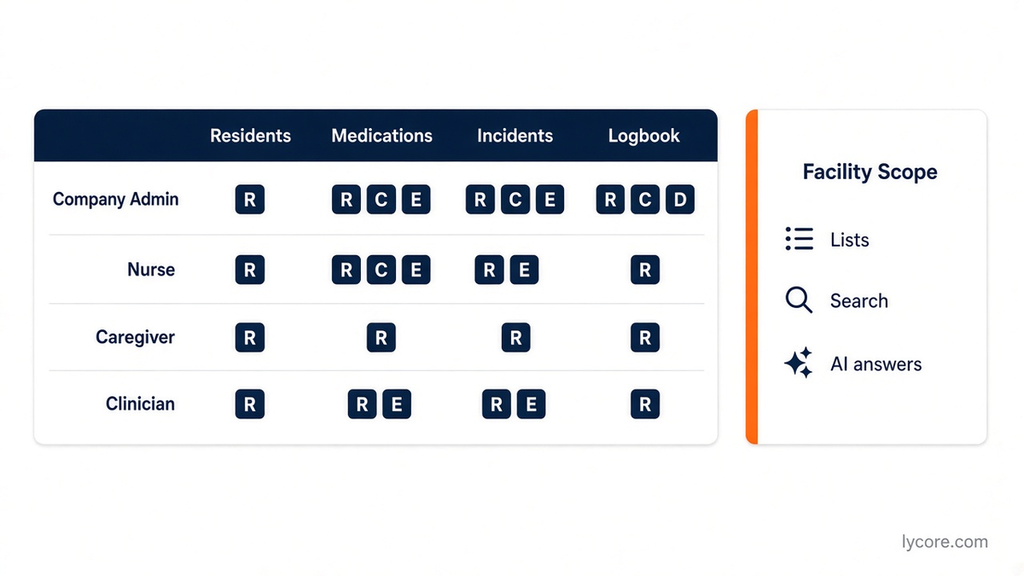
Role-based permissions should be a grid: groups (Company Admin, Nurse, Caregiver, Clinician) granted actions (read, create, edit, delete) on modules (Residents, Medications, Incidents). Ask to see the grid. A product that offers four fixed roles will not survive contact with a real staffing chart.
Facility scope everywhere
Here is the detail that most evaluations miss. Permissions decide what someone can do; facility scope decides where. A caregiver assigned to one community should see only that community’s residents, and that rule has to apply consistently to lists, records, dashboards, file downloads, reports, search, notifications and any AI features. LyCare applies facility scope to all of those, with company admins and owners seeing every facility. When you evaluate a vendor, search for a resident from another site while logged in as a single-site user. If search leaks, other things will too.
Care Operations Software Module Checklist: Daily Care
Next, the modules staff touch every shift. For each one, ask the vendor to perform the task live rather than describe it.
Medications and the med pass
The medication module is where weak products show first. You want orders with drug, strength, dose, route, schedule or PRN (as needed) with an indication and daily maximum, prescriber and dates. On the med pass, every scheduled dose should be grouped by pass and room, with clear states: given, refused, held, not available, late. Look for the rules behind those states. In LyCare a dose cannot be given more than an hour early, a dose more than an hour past due with nothing recorded counts as late, and that same definition drives the med pass, resident alerts, the dashboard and notifications. Consistency matters more than any single rule. Also check PRN follow-up (does the system ask whether it worked?), witnessed doses for controlled drugs, same-day undo with history kept, supply counts with refill points, and barcode scanning of wristbands and packages.
Ask how interaction and allergy warnings work and be wary of overclaiming. A curated list of well-documented problems with graded warnings is useful; it is not a full drug database, and a pharmacist still reviews. LyCare is explicit about this and requires a reviewer note before an order with a warning can be saved.
Dining and intake
Dining should hold a diet profile per person: diet type, texture and liquid levels, food allergies, assistance needed and seating. The meal screen should let staff record where someone ate and roughly how much in a couple of taps. The useful part is the rule on top, such as flagging low intake when the last three meals average under half.
Medical and home visits
For clinician visits, check scheduling for many residents at once, eligibility rules, and a fast visit queue. For home care, check visit check-in and check-out with time and location, care-plan task codes, and an exception list for late, short and missed visits that supervisors actually see.
Incidents, Logbooks and Staff Compliance
These three modules carry most of the liability weight, and they are where paper and spreadsheets hang on longest.
Incident reporting with deadlines
A good incident module records type, severity, timing, location, people involved, witnesses, statements, injuries, actions taken and follow-up review. The real value is what happens on save. In LyCare, a rules engine reads the company’s rules by state, care type, incident type and severity, and works out who must be told and by when. Each notification becomes a deadline with a countdown that staff mark as done. The module can also print some states’ official PDF forms filled in. Ask any vendor how its rules are maintained: who wrote them, when they were last checked, and what happens when a rule is wrong. LyCare shows, per rule, the regulation it comes from, a link to the official text, when it was last verified, and a status that can be Verified, Re-check due, Not verified yet or Problem reported. That transparency is the bar. Whatever the vendor says, have your own compliance advisor confirm the rules for your states. For the operational side of this topic, our guide to compliance and incident management in residential care goes deeper.
Logbooks that can be trusted
Shift logbooks look simple until you need to rely on one. Check for template-driven entries, signatures from the author and staff on the entry, approval by a manager, and locking after approval. One detail matters a lot: editing an entry should clear its signatures and ask for them again.
Staff compliance and expiry
Staff requirements such as certifications, training and background checks need templates per state, document uploads, manager review (never self-approval), and expiry dates that trigger reminders before and escalation after. Ask for an overview showing percent compliant by facility, with export.
Dashboards, Notifications and the Next Action
Every vendor shows a dashboard. The question is whether it tells people what to do next.
A start page per person versus a dashboard
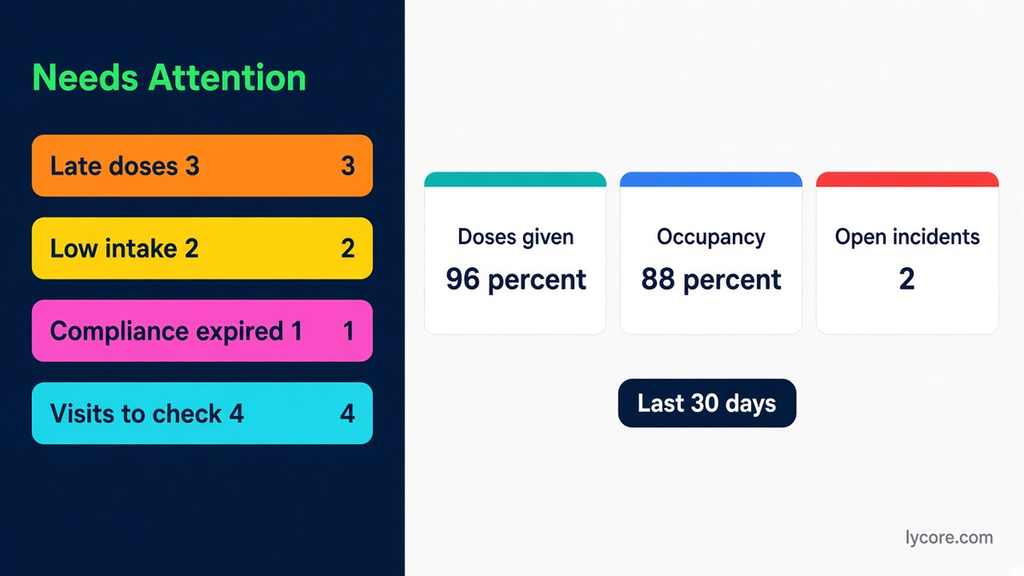
Floor staff and managers need different entry points. LyCare splits them: My day is each person’s start page, listing today’s appointments, items waiting on them (logbook entries to sign, compliance to review, partner requests), incident deadlines with countdowns, the current med pass and their own tasks. The Dashboard shows headline numbers over 7, 30 or 90 days for one facility or all, plus a Needs attention list where each line links to the matching work. Admins and managers land on the Dashboard; everyone else lands on My day. Ask any vendor what a caregiver sees first at 7 a.m., and whether they can act on it.
Notification routing
Notifications are where good intentions turn into alert fatigue. Ask for the routing table: which event goes to whom, at what urgency. A refused dose should reach nurses at that facility, not every admin in the company. Deadlines inside four hours should be urgent; a completed task should be informational. LyCare publishes exactly this kind of table and lets each person choose whether urgent items are emailed, mute kinds they do not want, and receive warnings as they happen or as a daily digest. Each event should notify a person once.
Time-based checks
Many care events are the absence of something: a dose not recorded, a visit with no check-in, a PRN with no follow-up, a certification that lapsed overnight. Ask how these checks run. If they only fire when someone opens a page, missed visits can sit unnoticed. Scheduled checks, plus checks when people use the app, close that gap.
Outside Partners, AI and the Audit Trail
Three more capabilities decide how safely the system deals with outside parties, automated assistants and future reviewers.
Partner access that is narrow and logged
Group homes in particular deal with lawyers and guardians ad litem who are entitled to some records. Email attachments are the usual workaround, and they leave no trail. A partner portal should let staff share specific sections (profile, placement history, case plan and court dates, incident reports, medications, documents) with a recorded legal basis, a reference number and an end date. Partners should have separate logins that can never reach staff screens, and clinical notes should never be shareable. In LyCare, partners can send requests with a needed-by date, staff answer in a thread, and every partner view and download is logged per resident.
AI that reads, not writes
AI features are now common in vendor pitches. The safe pattern is narrow. LyCare’s Ask LyCare answers plain-English questions such as who has had low intake this week, using only tools that read records the asker is allowed to see, links names to records, and never changes anything. Its incident drafting turns dictated notes into a structured report and lists what is missing, and staff review before saving. Every AI request is recorded with who asked, which tools ran and which residents came back. Ask vendors whether their AI respects facility scope and whether its requests appear in the audit log.
An audit trail you can actually read
Ask to see one resident’s history. Expect every change, who made it and when, with lines hidden from viewers who lack access to that module. Platform staff switching into your company, log-in-as sessions, report downloads and AI requests should all appear.
Questions to Ask Any Care Operations Software Vendor
Feature lists blur together after three vendor calls. These questions force specific answers; ask for responses in writing.
About the product
- Can we try the product ourselves, with realistic data, without a salesperson driving?
- Log in as a caregiver at a single facility. Search for a resident at another facility. What happens?
- Show the exact rule for a late dose, and show where else that rule is used.
- Edit a signed logbook entry. What happens to the signatures?
- Which events notify whom, at what urgency? Can we see the full table?
- For each state rule you ship, who verified it and when? What happens when a user reports a problem with a rule?
- Can we rename modules and resident terms per company without custom development?
About data and security
- How are tenants separated, and how is facility scope enforced on the server rather than just hidden in the interface?
- What is logged, how long is it kept, and can we export it?
- Which AI models and providers are used, whose API key is used, and is every AI request logged?
- What are the password, two-factor and session policies, and can we enforce two-factor for our company?
- How are uploaded files stored and served?
About commercials and exit
- How is pricing tiered: by facilities, residents, users or modules? What happens when we exceed a tier?
- How do we get all our data out, in what format, and how long does it take?
- What is your release cadence, and how are changes announced to staff?
For legal and regulatory questions, such as data processing terms or state-specific obligations, put the vendor’s answers in front of your attorney or compliance advisor before you sign.
Buy, Configure or Build
Most organizations should start by buying. A configurable product that matches 80 percent of your workflow, with renameable terms, custom fields and rule tables, will usually beat a custom build on time to value. Custom work makes sense in three situations.
When custom wins
The first is when your model of care does not fit any product, for example a provider running senior living, group homes and home care under one company with shared staff. The second is when the system is your product, such as a software company or a care network selling a platform to others. The third is when integration is the job: when you need care data flowing into your own scheduling, payroll or analytics systems in ways vendors will not support.
The hybrid route
There is a middle path: keep an off-the-shelf system for the regulated core and build focused tools around it, such as a family-facing app, an internal dashboard across systems, or an AI assistant over your exported data.
What a build costs
On Lycore’s service pages, projects are grouped into budget bands of USD 7K-15K, 15K-30K, 30K-50K and above 50K. Treat these as indicative. A single focused module, such as a staff compliance tracker or a partner request portal, can sit in the lower bands. A multi-tenant care platform with medications, incidents, rules, notifications, partner access and AI will sit above 50K. The drivers are the number of modules, how many states’ rules you need, integrations, mobile requirements and how much configuration you hand to admins rather than hard-coding.
Pros and Cons of a Dedicated Care Platform
Moving from paper and disconnected apps to one platform has real benefits and real costs.
Pros
- One record per person, so alerts, history and reports draw from the same data.
- Exceptions surface on their own: late doses, low intake, missed visits and expiring certifications appear without someone hunting for them.
- Deadlines and notifications are computed from rules rather than remembered.
- Outside partners get narrow, logged access instead of email attachments.
- Managers can compare facilities side by side using the same definitions.
Cons
- Rollout takes real training time, and floor staff will judge the product in its first week.
- Configuration (groups, rules, templates, terms) needs an owner inside your organization.
- Rules shipped by a vendor still need your own verification for your states.
- Switching later is expensive if data export is weak, so check it before signing.
- AI features add cost and need clear limits on what they can read and do.
Frequently Asked Questions
What is the difference between care operations software and an EHR?
An electronic health record is built around clinical documentation, typically for physicians and hospitals, with deep coding, orders and results. Care operations software is built around running a care setting day to day: medication passes, meals, incidents, logbooks, staff compliance, scheduling, home visits and partner access. A care operations product succeeds when a caregiver can record a dose in seconds, a manager can see what needs attention across facilities, and a deadline cannot be missed quietly.
Can one platform really serve senior living, group homes and home care?
It can, if the data model was designed for it. The shared foundation is the same: companies, facilities in specific states, people in care, staff assigned to facilities, permissions and audit. The differences sit in modules and terms. Group homes need case plans, court dates, caseworker contacts, restraints and allowances. Home care needs service plans, authorized hours and visit check-in. Senior living leans on med passes, dining and clinician visits. A platform that lets each company switch modules on, rename terms (resident, client, youth) and apply state rules per facility can cover all three. LyCare is built this way, with example organizations for each care type.
How long does it take to roll out care operations software?
It depends far more on your organization than on the software. The technical setup of facilities, staff, groups and templates can be done in days for a small operator. The slow parts are data migration (resident records, active medication orders, staff documents), deciding who owns configuration, and training each shift. Plan a pilot at one facility, run it for a few weeks with real use, fix the configuration, then roll out site by site. Avoid launching medications on the same day as everything else; it carries the most risk and deserves its own cutover with extra supervision.
Should we trust AI features in care software?
Trust them for narrow, checkable jobs and not for decisions. Useful patterns include read-only question answering over records the person is already allowed to see, with links to those records so answers can be verified, and drafting, such as turning dictated notes into a structured incident form that staff then review and save. Be cautious of AI that writes to records directly, makes clinical judgments, or sees data across facilities without scope checks. Ask the vendor which provider and model are used, whether requests are logged with the records returned, what daily limits exist, and whether free or trial accounts have AI switched off.
Conclusion
Care operations software is judged on the floor, not in the boardroom. Start your evaluation with the foundation: a clean company, facility and person model, a permission grid, and facility scope that holds across search, files, reports and AI. Then work through the daily modules, the liability-heavy ones (incidents, logbooks, compliance), and the surfaces that decide whether people act: start pages, needs-attention lists and notification routing. Ask the hard questions in writing, verify state rules with your own advisor, and insist on trying the product yourself. If no product fits your model of care, a focused build or a hybrid can, as long as it is scoped as carefully as a purchase.
Building care operations software? Talk to Lycore at https://www.lycore.com/contact-us/, and see how we approached it in LyCare.