

For years, adding export const runtime = 'edge' to a route was the standard trick for making a Next.js endpoint feel fast. That era is ending. The Next.js edge runtime is now deprecated in the Next.js docs, Vercel recommends moving every edge function to Node.js, and Vercel states that starting with Next.js 16.3, runtime = 'edge' is no longer supported for routes and pages. If your codebase has that line anywhere, you have a small but real migration to plan.
Key takeaways
- The Next.js edge runtime is deprecated, and Vercel states that from Next.js 16.3 setting the runtime to edge is no longer supported, so routes and pages run on Node.js.
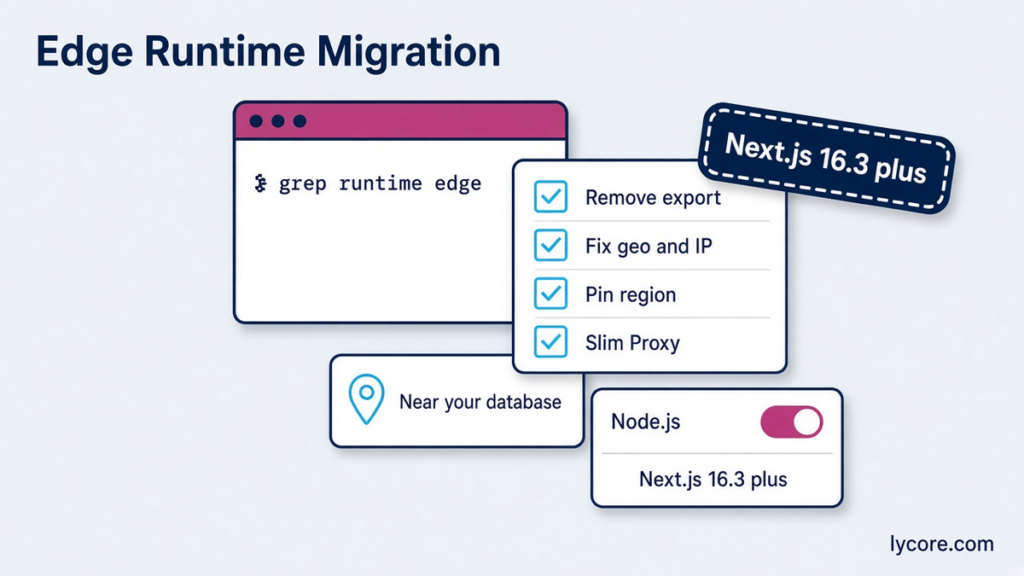
- Migrating off the Next.js edge runtime means deleting the runtime export from each route, replacing request.geo and request.ip using the next-request-geo-ip codemod, and pinning a function region near your data.
- Vercel’s Fluid compute, the default for new projects since April 23, 2025, lets one Node.js instance handle many concurrent requests and bills Active CPU only while code runs.
- Next.js 16 renamed middleware to proxy, which runs only on the Node.js runtime, and the official middleware-to-proxy codemod renames both the file and the export.
- A typical SaaS app with a handful of edge route handlers and one middleware file needs about a day of engineering plus a day of testing and latency measurement.
As of November 11, 2026. Facts below were checked against nextjs.org and vercel.com documentation on that date. The current Next.js release is 16.4.6.
The short answer: remove export const runtime = 'edge' from your pages, layouts and route handlers, and let them run on the default Node.js runtime. Then check three things: any code that relied on edge-only behavior (request geolocation, running near the user), any middleware you still keep on edge, and where your Node.js functions run relative to your database. For most apps this is a one-day change; for apps that built their architecture around edge latency it deserves a proper audit.
What Changed With the Next.js Edge Runtime?
The change did not arrive as one big announcement. It came in steps across the Next.js 15 and 16 releases and in Vercel’s own documentation, which is why many teams have only noticed it through a build warning.
What the Next.js docs now say
The runtime route segment config reference lists two values: 'nodejs' as the default and 'edge' marked as deprecated. The guidance is blunt: the Edge Runtime is deprecated, so remove the runtime export from your route files. Next.js also has a dedicated error message page, “Edge Runtime Deprecated”, which explains that the warning fires when any route uses export const runtime = 'edge', and that the fix is simply to delete the line because Node.js is the default. It applies to page, layout, route and API route files.
If you enable Cache Components, the rule is stricter. The docs say to remove the runtime export entirely, even runtime = 'nodejs', because Cache Components uses the default Node.js runtime and does not support the segment config at all.
What Vercel says
Vercel’s Edge Runtime page (last updated August 3, 2026) opens with two notes. First: “We recommend migrating from edge to Node.js for improved performance and reliability.” Second: starting in Next.js 16.3, setting runtime = 'edge' is no longer supported, and routes and pages run on Node.js. Next.js 16.3 shipped on August 3, 2026, so any project on 16.3 or 16.4 that still carries the export on Vercel is already running that code on Node.js, whether the team knows it or not.
The timeline in one table
| Version or date | What changed |
|---|---|
| Next.js 15.2 | Middleware can use the Node.js runtime (experimental) |
| Next.js 15.5 | Node.js middleware becomes stable |
| Next.js 16.0 (Oct 22, 2025) | Middleware renamed to Proxy; Proxy runs on Node.js only |
| Next.js 16.3 (Aug 3, 2026) | Vercel: runtime = ‘edge’ no longer supported for routes and pages |
| Next.js docs (Oct 2026) | runtime reference marks ‘edge’ deprecated; remove the export |
Why Is Vercel Moving Away From Edge Functions?
The edge runtime made sense when serverless Node.js meant slow cold starts and one request per container. Both of those assumptions have changed, and the edge runtime’s restrictions now cost more than they save.
Fluid compute removed the main reason to use edge
Vercel made Fluid compute the default for new projects on April 23, 2025. Fluid compute lets one Node.js instance handle many concurrent requests, keeps instances warm, and bills Active CPU only while your code is actually running, not while it waits on a database or an AI model. Vercel’s docs note that both edge and Node.js functions now run on Fluid compute with Active CPU pricing. The cost and cold-start gap that once justified edge has largely closed.
The edge runtime was always a subset
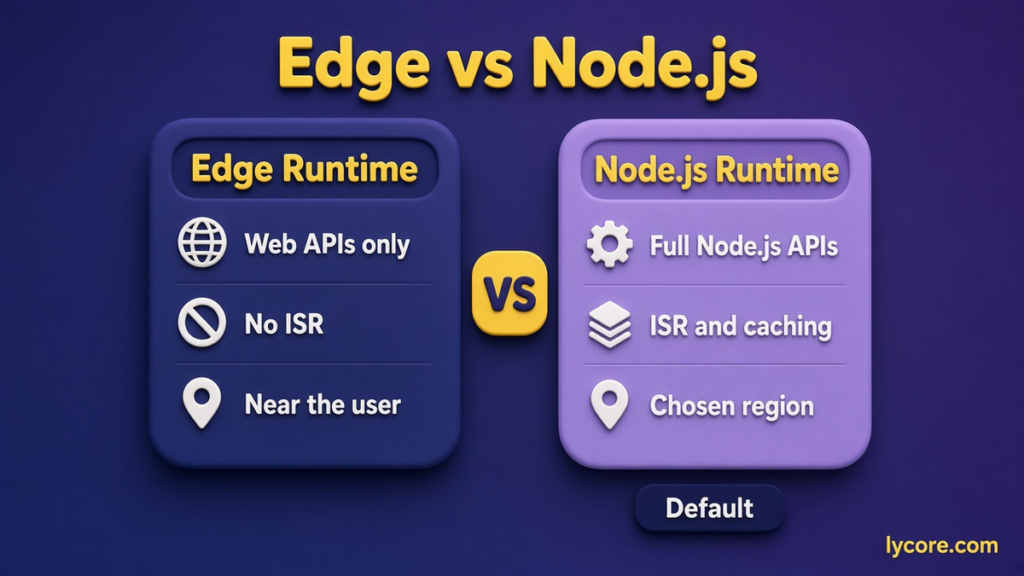
The Next.js Edge Runtime reference lists the restrictions plainly: no native Node.js APIs such as reading or writing the filesystem, no direct require, no eval or new Function, no runtime WebAssembly compilation, no Incremental Static Regeneration, and only packages that ship ES modules without Node.js internals. In practice that meant database drivers, PDF generators, image libraries and many SDKs either did not work or needed special edge builds. Teams spent real time debugging “module not found” errors that had nothing to do with their product.
Node.js got faster inside Next.js
Next.js 16.3 replaced web streams with native Node.js streams in the App Router rendering layer. In the Next.js team’s own benchmarks, apps handled up to 22% more requests under load with no code changes. That is a framework-level investment in the Node.js path, and it is a strong signal of where future performance work will go. Vercel Functions on Node.js also give you more headroom: up to 2 GB of memory on Hobby and 4 GB on Pro, a 300-second default duration and up to 800 seconds on Pro, compared with edge functions that must start responding within 25 seconds.
Which Next.js Edge Runtime Code Do You Need to Migrate?
Before touching anything, find every place the edge runtime shows up. It hides in more places than the obvious route handlers.
Search the codebase
Start with a plain text search. You are looking for the segment config, older experimental spellings, Pages Router API routes with an edge config object, and middleware files.
# App Router segment config, including older spellings
grep -rnE "runtime\s*=\s*['\"](experimental-)?edge['\"]" app src

# Pages Router API routes using a config object
grep -rnE "runtime:\s*['\"](experimental-)?edge['\"]" pages src

# Middleware or proxy files
ls middleware.* proxy.* src/middleware.* src/proxy.* 2>/dev/null
Sort what you find into three buckets
- Plain removals. Route handlers and pages that set edge out of habit and only use
fetch, JSON and Web APIs. Delete the line and move on. - Behavior-dependent routes. Code that read
request.geoorrequest.ip, relied on running close to the user, or streamed long AI responses under edge limits. These need a small rewrite and a test. - Middleware. Anything in
middleware.ts. This is a separate decision, covered below, because Proxy only runs on Node.js.
Check dependencies you added for edge
Many teams installed edge-compatible variants of libraries: HTTP-based database drivers, lightweight JWT libraries, or edge builds of SDKs. These keep working on Node.js, so nothing breaks. But once a route runs on Node.js, you may be able to switch back to the standard driver with connection pooling, or to a library you avoided because it needed fs or crypto from Node. Note these as optional clean-ups rather than blockers. If you are reviewing the whole stack at the same time, our guide to an AI-proof tech stack covers which dependencies are worth standardizing.
How Do You Move Routes and Pages to Node.js?
For the plain removals, the migration really is one line per file. The work is in testing the routes whose behavior changes.
Step 1: delete the runtime export
// app/api/search/route.ts
- export const runtime = 'edge'

export async function GET(request: Request) {
  const q = new URL(request.url).searchParams.get('q') ?? ''
  const results = await searchIndex(q)
  return Response.json({ results })
}
Do not replace it with runtime = 'nodejs' unless you have a reason. Node.js is the default, and if you plan to turn on Cache Components later, the docs require removing even the explicit Node.js export. If you still have 'experimental-edge' from older versions, delete that too.
Step 2: replace request.geo and request.ip
The geo and ip properties on NextRequest were removed back in Next.js 15. On Vercel, the replacement is the @vercel/functions package, and Next.js ships a codemod, next-request-geo-ip, that installs it and rewrites the calls for you.
npx @next/codemod@latest next-request-geo-ip .

// result
import { geolocation, ipAddress } from '@vercel/functions'

export function GET(req: Request) {
  const geo = geolocation(req)
  const ip = ipAddress(req)
  return Response.json({ country: geo.country, ip })
}
If you self-host or deploy elsewhere, read the equivalent headers your proxy or CDN sets instead, and treat them as hints, not security controls.
Step 3: set a region and test the slow paths
Edge functions ran near the visitor by default. Node.js functions on Vercel run in your project’s function region, which defaults to iad1 (Washington, D.C.). Set the region to wherever your database lives, then deploy a preview and test the routes from your second bucket: streaming endpoints, OG image routes, anything that touched headers or cookies. Run your end-to-end suite against the preview, not just the build. A green build only proves the code compiles.
What Happens to Middleware and Proxy?
Middleware is where the edge runtime was most deeply embedded, and it is where the guidance is most nuanced.
Proxy is Node.js only
Next.js 16 deprecated the middleware filename and renamed it to proxy. The Proxy reference is explicit: Proxy defaults to the Node.js runtime, the runtime option is not available in Proxy files, and setting it throws an error. The version 16 upgrade guide adds that if you want to keep using the edge runtime, you keep using middleware for now, and that further edge instructions would follow in a minor release. Treat staying on edge middleware as a temporary holding position, not a plan.
# rename the file and the export with the official codemod
npx @next/codemod@latest middleware-to-proxy .

// proxy.ts
import { NextResponse, type NextRequest } from 'next/server'

export function proxy(request: NextRequest) {
  if (!request.cookies.has('session')) {
    return NextResponse.redirect(new URL('/sign-in', request.url))
  }
  return NextResponse.next()
}

export const config = { matcher: ['/dashboard/:path*'] }
Keep Proxy thin anyway
Moving to Node.js means Proxy can now use full Node.js libraries, including database clients. That does not mean it should. The Next.js and Better Auth docs both warn that Proxy is for optimistic checks such as redirects, not full session validation or slow data fetching. Proxy runs on every matched request, so a database call there adds latency to every page view. Do the real authorization check in the page, route handler or server action, as close to the data as possible.
Audit what your middleware actually does
Middleware files tend to accumulate several jobs: auth redirects, locale detection, A/B bucketing, header rewrites and bot filtering. Some of those belong in next.config redirects and headers, some in your CDN rules, and only a few genuinely need code on every request. Splitting them out during this migration usually leaves a smaller, faster Proxy file.
Will Dropping Edge Make Your App Slower?
This is the question every team asks, and the honest answer is: usually not, sometimes faster, occasionally slower in a way you can fix.
Data distance matters more than user distance
An edge function close to a user in Seattle still had to call a database in Virginia. If one request made four sequential queries, it crossed the country four times. A Node.js function in the same region as the database makes those four calls over a few milliseconds of network, then sends one response across the country. For data-heavy routes, that is typically faster. This is the same trade-off we discuss in our piece on cloud-native architecture: put compute next to state.
Where edge genuinely helped
Routes that needed no data at all, such as simple redirects, personalization from a cookie, or a static JSON response, did benefit from running near the user. For those, the better tool is now caching: static generation, CDN caching headers, ISR or 'use cache', all of which serve from Vercel’s global CDN without running a function. A response that never invokes compute will beat any runtime.
Measure before and after
Record p50 and p95 latency for your top ten routes before you migrate, using your existing observability or Vercel’s function logs. Deploy the change to a preview, replay the same traffic or run a load test, and compare. If a route got slower, the cause is almost always region placement or a missing cache, not Node.js itself. Global audiences with multi-region databases can configure multiple function regions and failover regions on Vercel; teams with one database should pick one region and cache aggressively.
What Should You Do If You Self-Host or Use Another Platform?
Not every Next.js app runs on Vercel, and the deprecation affects other deployment targets in slightly different ways.
Docker and Node.js servers
If you run next start in a container, every route already ran on your own Node.js server, and the edge setting mainly limited which APIs your code could use. Removing the export lifts those restrictions with no change to how you deploy. This is the easiest case.
Cloudflare and other edge-first hosts
Older Cloudflare setups used @cloudflare/next-on-pages, which only supported the edge runtime. The OpenNext Cloudflare adapter instead runs your app with the Next.js Node.js runtime on top of Workers’ Node.js compatibility, and Cloudflare now recommends vinext for new Next.js apps on Workers. If you are on next-on-pages, the edge deprecation is a good moment to plan that move, because your edge-only code path is the one being retired.
Adapters and the Adapter API
Next.js 16.2 introduced a stable Adapter API for deployment platforms. Hosts that implement it decide how routes map onto their compute. Check your platform’s adapter documentation for how it handles routes that previously declared edge, and test on a staging environment before upgrading production to 16.3 or later.
Pros and Cons of Dropping the Next.js Edge Runtime
Pros
- Full Node.js API access: filesystem, native crypto, standard database drivers and the whole npm ecosystem.
- One runtime to reason about, test and debug instead of two with different rules.
- ISR and the newer caching model work on every route.
- More memory and longer durations for AI streaming, file processing and reports.
- Compute placed next to your database, which often lowers latency for data-heavy pages.
Cons
- Routes that served global users without data access lose automatic placement near the visitor unless you cache them.
- Middleware still on edge is in a holding pattern and will need a second change later.
- Geolocation and IP code needs rewriting and retesting.
- Teams with no latency baseline cannot prove the change was neutral, so plan time to measure.
Frequently Asked Questions
Will my build fail if I leave runtime = ‘edge’ in place?
The Next.js docs describe it as a deprecation and show a warning page, “Edge Runtime Deprecated”, rather than a hard error for pages and route handlers. Vercel’s documentation states that from Next.js 16.3 the setting is no longer supported and routes and pages run on Node.js. The practical effect is that the line is dead code on current versions: it no longer gives you edge placement, but it can still confuse anyone reading the file into thinking the route has edge restrictions or edge latency. The one exception is Cache Components, where the docs require removing any runtime export. Remove it now so the next upgrade is not blocked by it, and so your code describes what actually runs.
Does the edge deprecation affect my OG image or streaming AI routes?
Both types of route were commonly set to edge, mainly for fast startup. On Node.js they keep working, and AI streaming routes benefit from longer maximum durations on Vercel Functions: 300 seconds by default and up to 800 seconds on Pro, compared with edge functions that had to begin responding within 25 seconds. For image generation routes, remove the export and render a few images in a preview deployment to confirm fonts and assets still load from the paths you expect. If the route reads local font files, Node.js filesystem access can actually simplify the code you previously wrote to fetch fonts over HTTP.
Should I move middleware to Proxy now or wait?
If your middleware only does cookie checks, redirects, rewrites and header changes, move it to Proxy now with the middleware-to-proxy codemod. It will run on Node.js and you are done. If it depends on edge-specific behavior, such as running geographically close to every visitor for personalization, you can keep the middleware filename on edge for now, as the version 16 upgrade guide allows. But treat that as a deadline, not a destination. Use the time to move personalization into cached variants or CDN rules, and keep the remaining Proxy logic small so its added latency stays negligible on every request.
How long does an edge runtime migration take?
For a typical SaaS app with a handful of edge route handlers and one middleware file, expect a day of engineering plus a day of testing and measurement. Apps that built heavily around edge, for example with edge-only database drivers, geolocation-driven rendering or many middleware responsibilities, can take a week or two, mostly in testing and in moving logic to the right layer. The code changes are small; the risk sits in behavior you did not know depended on edge placement. A latency baseline before you start and a preview deployment with your end-to-end tests are what keep this a quiet change rather than an incident.
Conclusion
The edge runtime was a good answer to a problem that Fluid compute and faster Node.js rendering have mostly solved. The migration is mechanical for most routes: search, delete the export, replace geo and IP reads, pin your function region near your data and slim down Proxy. Where you genuinely need speed near the user, reach for caching rather than a restricted runtime. If you are also rethinking the rest of your Next.js setup, our notes on building a SaaS product cover the other decisions that tend to surface during an upgrade like this one.
Building or upgrading a Next.js product? Talk to Lycore. Our offshore team can audit your edge usage and handle the upgrade at USD 25 per hour, as a fixed-price project or on a monthly retainer, and our MVP development team builds new Next.js apps on the current runtime from day one.